

Mesh vs. parametric: The DNA of 3D files
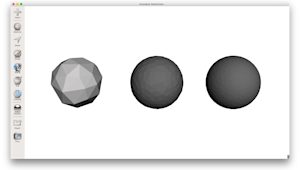
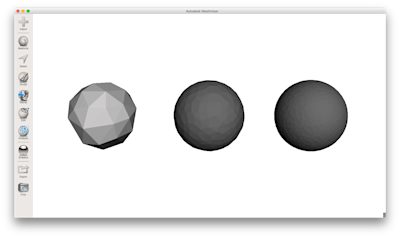
Every 3D file falls into one of two categories: mesh or parametric. Mesh files such as STL and OBJ describe the surface of an object using a collection of interconnected triangles. This is known as tessellation. The more triangles a mesh has, the smoother the surface appears, but the larger the file becomes.
In contrast, parametric files like STEP and IGES describe geometry using mathematical equations. Instead of approximating a curve with flat triangles, a parametric file defines a cylinder or a sphere with absolute precision. While most 3D printers require a mesh to function, engineers prefer parametric files for the design and analysis stages because these are far easier to edit and maintain ideal geometric intent.
|
Feature |
Mesh (e.g., STL, OBJ, 3MF) |
Parametric (e.g., STEP, IGES) |
|
Geometry |
Approximated by flat triangles. |
Defined by exact math equations. |
|
Edge Quality |
Can be ‘faceted’ or blocky. |
Always perfectly smooth. |
|
Editability |
Very difficult (changing one part affects the mesh). |
Easy (parametric history & dimensions). |
|
File Size |
Scales with detail (triangle count). |
Stays small regardless of detail. |
|
Manufacturing |
Native language for Slicing software. |
Gold standard for CNC & DFM Analysis. |
The 5 essential 3D printing file formats
While dozens of formats exist, the industry is dominated by five core types. Focusing on these guarantees compatibility with almost any professional service provider.
STL (standard triangle language)
The STL is the oldest and most universal format in the industry. It simplifies a model into a ‘skin’ of triangles. When exporting an STL, resolution is your primary concern. If the triangles are too large, the final print will look ‘faceted’ or blocky. However, setting the resolution too high creates unmanageable file sizes that can crash slicing software without adding any visible quality to the print.
3MF (3D manufacturing format)
Think of 3MF as the ‘smart’ successor to the STL. It was designed specifically for modern manufacturing to solve the limitations of older formats. A single 3MF file can hold multiple objects, internal lattice structures, material specifications, and even color data, all in a highly compressed, smaller file size.
OBJ (object file)
The OBJ format is the go-to choice when aesthetics are the priority. Unlike a standard STL, an OBJ can store texture maps and color information. This makes it a good choice for technologies such as PolyJet or Mimaki, where a part might require full-color gradients or specific surface textures defined by an image file.
STEP and STP
A 3D printer cannot ‘read’ a STEP file directly, because it must be converted to a mesh first. However, STEP remains the gold standard for sharing files between engineers. It is the best format for automated Design for Manufacturing (DFM) analysis as it preserves the mathematical ‘truth’ of the design. Providing a STEP file alongside a mesh often helps manufacturers to verify dimensions and suggest optimizations.

How to export the perfect 3D printing file
To ensure a seamless transition from screen to machine, there are four logical stages.
First, check the manifold geometry. Your model must be ‘watertight’. This means every edge must connect to two faces, leaving no holes or ‘flipped normals’ in the mesh. A non-manifold model will cause errors in the slicing software.
Then, choose the resolution: For most industrial prints, a ‘fine’ or a ‘high’ setting is sufficient. Look for an angle tolerance of around 1 degree and a linear deviation of 0.01 mm.
Also set units: This is the most common cause of scale errors. Always verify if your export settings match your design units. Exporting a millimeter-designed part in inches will result in a part that is 25.4 times too large.
Lastly, consider the orientation: While the manufacturer usually determines the final build orientation to optimize for support structures and strength, exporting the file in its intended ‘up’ position enables the quoting engine to provide a more accurate cost estimate.
Comparison table: Which file should you use?
To simplify your selection process, the table below compares the most common file formats based on their primary use cases and technical capabilities. Use this as a quick reference when deciding which format best aligns with your project requirements.
|
Format |
Best for |
Supports color? |
Editable? |
|
STL |
Simple prototypes |
No |
No |
|
3MF |
Complex assemblies |
Yes |
Yes |
|
OBJ |
Visual/Full-color parts |
Yes |
No |
|
STEP |
Industrial DFM & CNC |
No |
Yes |
Can the wrong file type affect print quality?
Using the wrong settings or format can lead to two primary failure modes: tessellation errors and scaling disasters. Tessellation errors occur when a low-resolution mesh export creates visible flat triangles on what should be a smooth, curved surface. This is a permanent defect that no amount of post-processing can easily fix.
Unit mismatches are equally problematic. Because most mesh formats (like STL) are ‘unitless’, the software only sees numbers. If the file says ‘10’ and your exporter thinks in inches while the printer thinks in millimeters, your part will arrive at the wrong scale. By consistently using parametric files for analysis and high-quality 3MF or STL files for production, you mitigate these risks and ensure the success of your project.
Frequently asked questions
What file types are used for 3D printing?
The most common file types in the industry are STL, 3MF, and OBJ. These are mesh-based formats that translate your design into a language that slicing software can understand.
While STL is the long-standing universal standard, 3MF is rapidly gaining popularity because it can store more data, such as color, materials, and internal structures in a much smaller file. For professional engineering and DFM analysis, STEP files are also frequently used during the initial stages to ensure geometric precision before the final mesh conversion.
What’s the best file type for 3D printing?
The ‘best’ format depends on the complexity of your project. For standard industrial parts where geometry is the main concern, a high-resolution STL or a STEP file is usually sufficient. However, if your project involves complex assemblies, multiple materials, or custom lattices, 3MF is the better choice as it prevents the data loss often associated with older formats. If your part requires full-color textures or intricate surface maps, the OBJ format remains the industry benchmark for capturing that visual detail.
Do all 3D printers use STL files?
While nearly every 3D printer on the market is compatible with STL files, they do not use them directly for the actual print. A 3D printer requires G-code, which is a list of specific coordinate instructions to move the nozzle or laser. To get there, you must first run your STL (or 3MF/OBJ) through a ‘slicer’ program. It is also important to note that many modern industrial printers now prefer 3MF files as these provide a more complete ‘manufacturing package’ than the limited, geometry-only data found in a standard STL.